Grade the Agent: AIP Evals From Suite to Regression
We published the FM-AIP-02 chatbot as a function, which is the gate that unlocks evaluation, then built an evaluation suite with the stringContainsAllKeywords evaluator and three test cases taken from verified live traffic. First run: 3 passed, 0 failed, average 14s 477ms per case. We then changed one keyword to force a failure and the suite caught it: the agent answered LOW while the test demanded MINIMAL, red X, correct behavior. One real field repair: we clicked Run while a suite save was still in flight and the run executed the stale definition, failing a case that was already fixed. Final state: suite green, 3 of 3, saved in the project. Hard limit found: chatbot functions report no token or compute metrics to evals, every cost column reads No value.
- FM-AIP-02. The suite evaluates the chatbot that module publishes. Do them in order.
Field notes from the Avinyr lab. Everything below was observed live on 2026-09-04 in AIP Evals on our cloud enrollment. The work order notes are synthetic, labeled synthetic, and written by us. Every screenshot is ours.
[ READ THIS FIRST: WHAT THIS MODULE IS ]
FM-AIP-02 ended with three good conversations. That proves almost nothing. An agent that triaged three notes correctly today can trip on the fourth tomorrow, after you tweak the instructions, swap the model, or Palantir ships a platform update. Single conversations are anecdotes. This module builds the net that turns anecdotes into a signal.
AIP Evals treats your agent like software. You publish the chatbot as a function, define test cases with known inputs, attach an evaluator that grades the output, and run the whole set on demand. When the run goes red, you know which case broke, what the agent actually said, and how long it took.
The run button tells you the most important fact up front: it reads "Run evaluation suite (on v2.0.0)". The suite grades the published version of your agent, not the draft sitting in your editor. Change the draft all you want; the eval does not see it until you publish.
[ WHAT YOU WILL HAVE AT THE END ]
One evaluation suite, "FM-AIP-02 maintenance triage desk - evaluation suite", saved in your project, targeting the published chatbot function v2.0.0. One evaluator, stringContainsAllKeywords, checking the agent's response for the words that must be there. Three test cases with verified inputs. Four recorded runs: one green, one deliberately red, one red for the wrong reason (a race we caused), one green again. You will know exactly how to tell those apart.
| What you might expect | What AIP Evals actually does |
|---|---|
| Evals run against the agent you are editing | They run against the last published function version. The button says so |
| You get cost telemetry per run | Chatbot functions report no token or compute metrics. Every cost column reads No value |
| A failing eval means the agent broke | Ours failed because the test was wrong. The agent answered correctly |
| Saving a suite and immediately running is safe | The run button stays live during a save. We raced it and graded a stale suite |
[ STEP 1: PUBLISH THE CHATBOT AS A FUNCTION ]
Open your FM-AIP-02 chatbot and find the Evaluation section in the left rail. On a chatbot that is only published as a chatbot, evaluation stays locked: the suite needs a function to call, and the chatbot is not one yet.

Publish from the dialog. The publish flow offers a combined artifact: chatbot and function, version 2.0.0 in our case, with the function API name fmAip02MaintenanceTriageDesk.


Return to the Evaluation section. It is unlocked now, with the option to create an evaluation suite.

This gate is the design telling you something: evals are a property of shipped versions, not of work in progress. If you cannot eval it, you have not shipped it.
[ STEP 2: CREATE THE SUITE AND PICK AN EVALUATOR ]
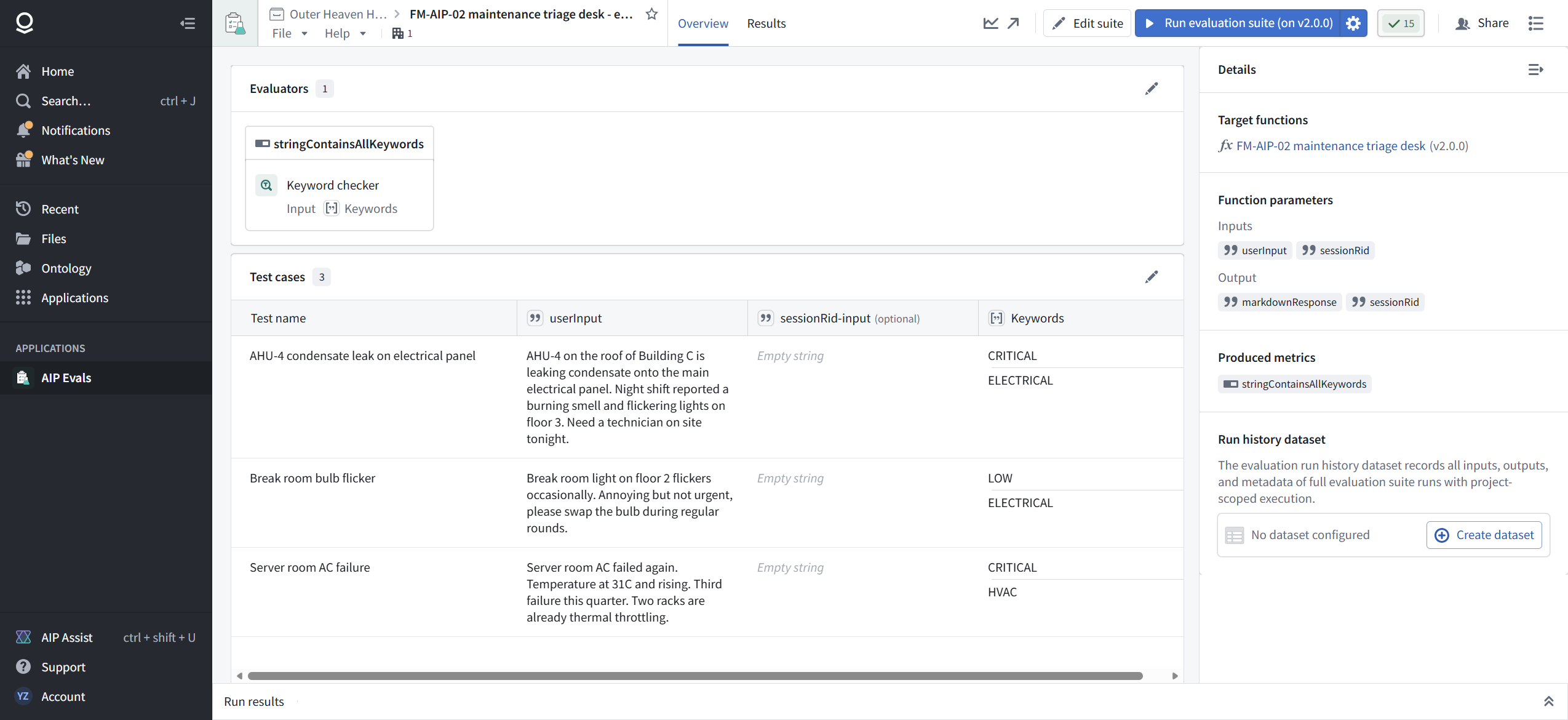
Create the suite and save it into your project. Ours is named "FM-AIP-02 maintenance triage desk - evaluation suite" and lives in the same project as the chatbot. The editor has three zones: evaluators on the left, the test case table in the center, and a setup panel on the right.

Open the evaluator catalog. There are several graders, including LLM-as-a-judge, which uses a model to score the response, and keyword-based checks, which are deterministic string matching.

Pick Keyword checker, internal name stringContainsAllKeywords, for the first suite. The detail view explains the contract: it passes when the actual value contains every keyword you list.
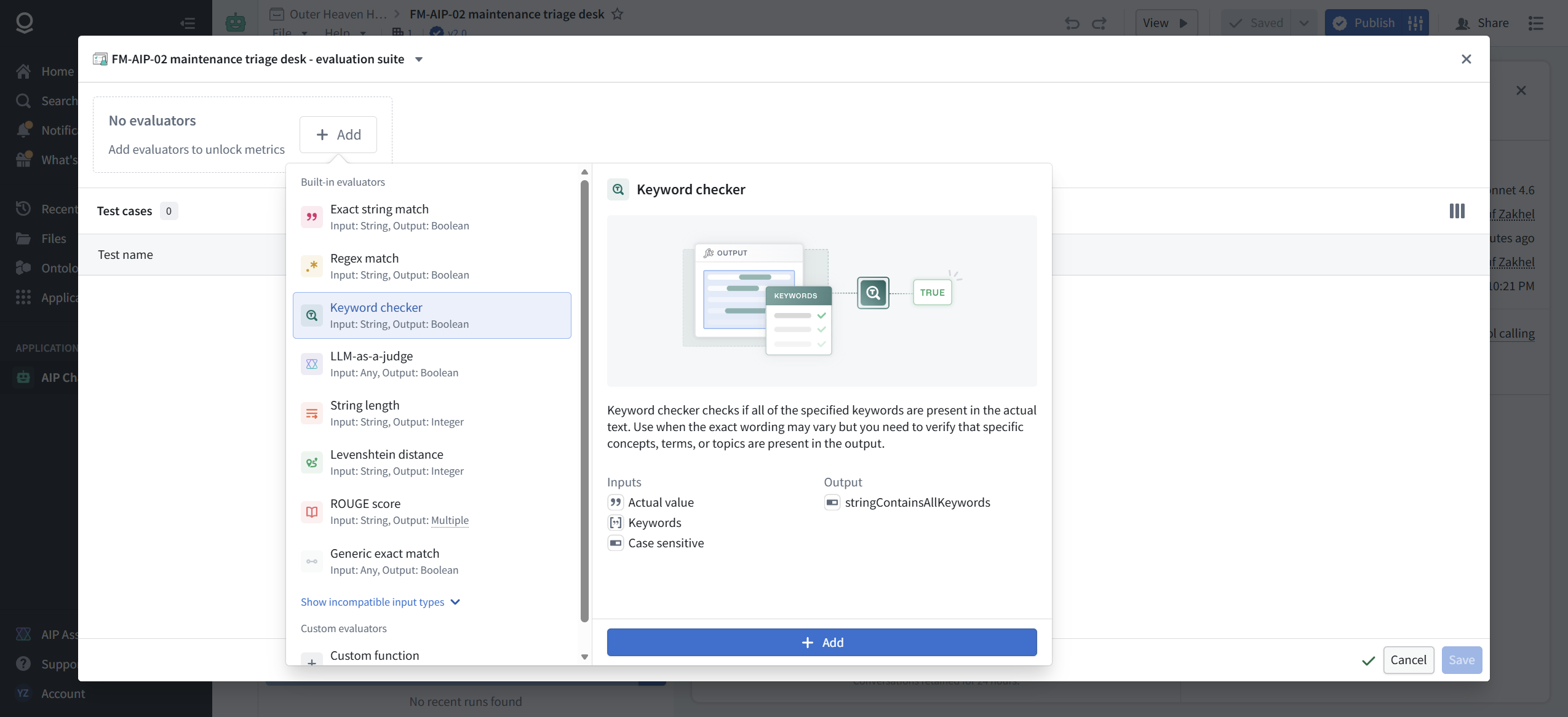
Why keywords first: they are cheap, fast, and honest about their limits. A keyword check cannot tell you the triage is smart. It can tell you the word CRITICAL is present in a response that must contain it. That is the floor. LLM-as-a-judge is the ceiling, and it costs you a model call per case per run. Start at the floor.
[ STEP 3: CONFIGURE THE EVALUATOR ]
Three inputs to wire.
Actual value: pick markdownResponse from the generated parameters. That is the agent's reply text, the thing the user reads.
Keywords: create a new per-test-case parameter. This is the good design decision in this UI: the parameter becomes a column in the test case table, so each case carries its own expectations. A CRITICAL case and a LOW case share one evaluator but not one keyword list.
Case sensitive: the one required input with no default. Switch it to a static value and set False. Case-insensitive matching absorbs harmless casing drift in model output. Only turn it on if case carries meaning in your domain.


[ STEP 4: WRITE TEST CASES FROM REAL TRAFFIC ]
Add test cases, Manual. Three rows, all inputs taken from notes we had already run live in FM-AIP-01 and FM-AIP-02:
- AHU-4 condensate leak on electrical panel. The full emergency note about condensate on the panel, burning smell, flickering lights. Keywords: CRITICAL, ELECTRICAL.
- Break room bulb flicker. Non-urgent note, swap during regular rounds. Keywords: LOW, ELECTRICAL.
- Server room AC failure. 31C and rising, third failure this quarter. Keywords: CRITICAL, HVAC.

Write cases from traffic you have verified by hand. The keyword list is your ground truth, and ground truth you invented without watching the agent is how you get a suite that grades your imagination.
Save the suite. Back in the chatbot editor, the Evaluation panel now lists the suite, three cases, and the run button.

[ STEP 5: RUN IT GREEN ]
Run the suite. Each case starts a fresh chat session, sends the input, waits for the agent and its tool call, then grades the response. Our three cases took between 13 and 15 seconds each.
Result: 3 passed, 0 failed. stringContainsAllKeywords average pass 100%. Duration average 14s 477ms.

Two numbers on that summary line deserve attention, because of what is missing: Compute second (avg) N/A, Input Tokens (avg) N/A. Hold that thought for Step 6.
[ STEP 6: READ THE RUN, NOT JUST THE VERDICT ]
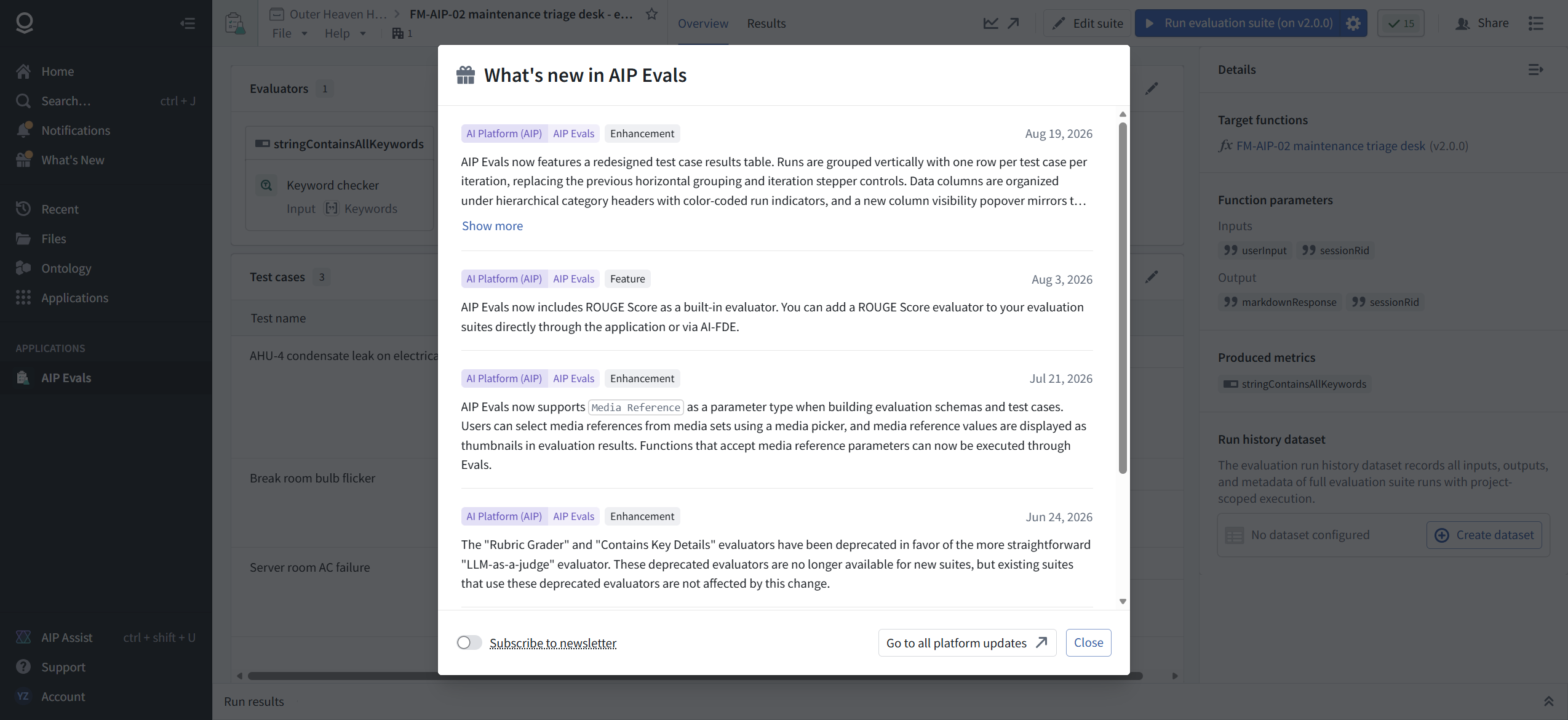
The suite has its own page, reachable from the suite name link. AIP Evals is a standalone application, not just a tab inside the chatbot editor. On first visit we got the app's changelog, which is worth reading because it dates the surface you are standing on: a redesigned results table landed 2026-08-19, a ROUGE Score evaluator landed 2026-08-03, and on 2026-06-24 the Rubric Grader and Contains Key Details evaluators were deprecated in favor of LLM-as-a-judge. Old suites keep working; new suites cannot add them.
The Overview tab shows the full suite definition and, in the Details panel, the target function with its version, the parameters, and the produced metrics. It also shows a Run history dataset section: an opt-in dataset that records all inputs, outputs, and metadata of every suite run. Ours is not configured. If you are going to run evals weekly, that dataset is how you trend pass rates over time instead of squinting at the Results tab.
The Results tab has two views. Runs is the history table: one row per run, with case count and average duration.

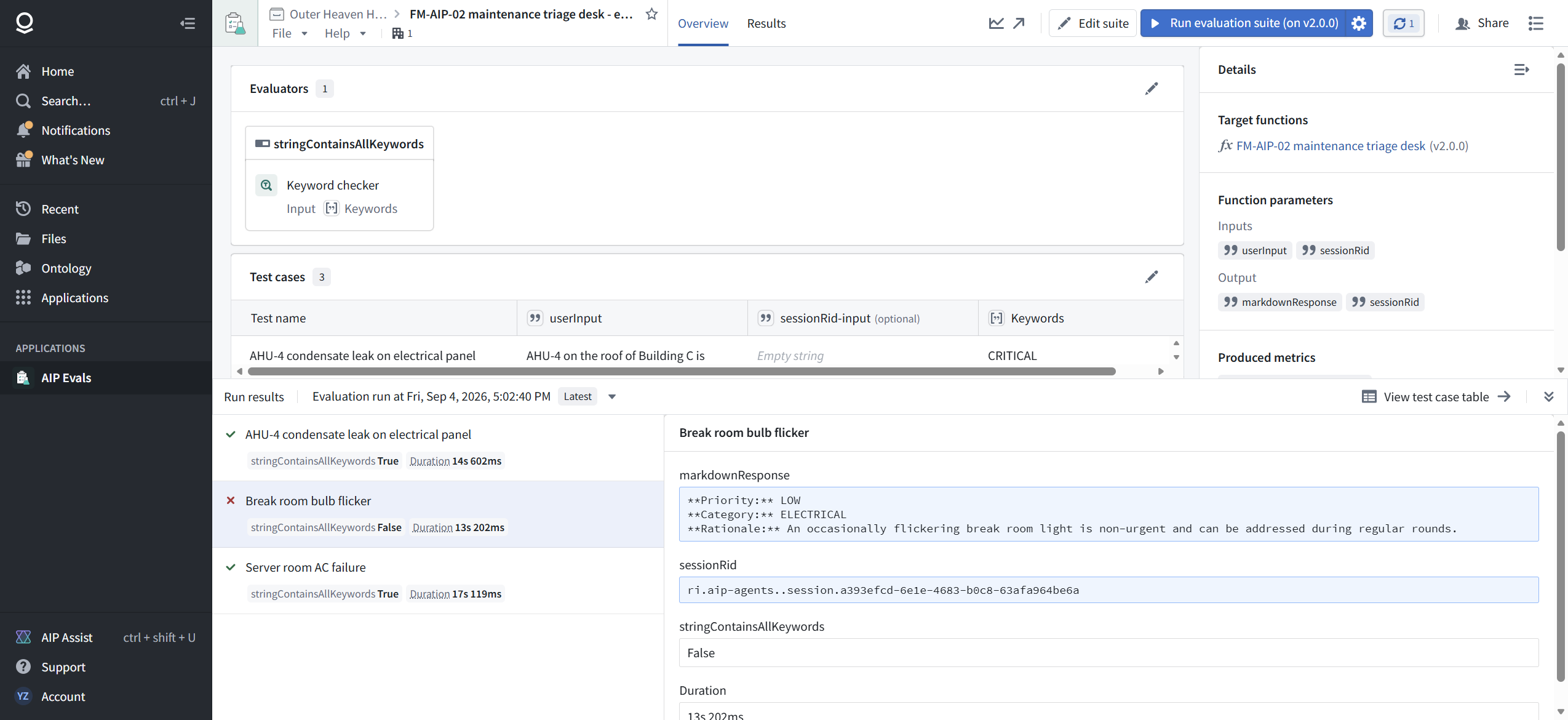
Test cases is the per-case table, and it needs you to pick a run from the selector first. Then you get the real audit: per case, the agent's actual response text, the keywords it was graded against, the verdict, and the duration. The agent's actual values were exactly what the live chats produced: "Priority: CRITICAL" and "Category: ELECTRICAL" on the emergency, "Priority: LOW" on the bulb.

Now close the loop on those missing numbers. Every case, every run: compute, input tokens, and output tokens all read No value. The chatbot function does not emit token telemetry to the eval surface. FM-AIP-01's Logic function metered tokens per run; the chatbot wrapper does not pass them through. If per-run cost matters to you, and it should, you cannot get it here.
[ STEP 7: MAKE IT FAIL ON PURPOSE ]
An eval that has never failed has never tested anything. So we broke one.
Edit suite, change the bulb case's first keyword from LOW to MINIMAL, a word the agent never uses, and save.

Run again. The suite caught it: AHU-4 passed in 14s 602ms, Server room passed in 17s 119ms, and Break room bulb flicker went red in 13s 202ms.

Open the failing case. The detail shows why: the agent responded "Priority: LOW / Category: ELECTRICAL" with a correct rationale, and the evaluator answered False because MINIMAL never appears. The agent was right. The test was wrong. That inversion is the whole reason you read failures instead of just counting them: a red eval can mean the agent regressed, the test drifted, or the requirement changed, and the response text in the detail panel is how you tell which.
[ STEP 8: THE RACE WE DID NOT PLAN ]
Here is where we got sloppy, and it is worth more than the planned failure.
We reverted MINIMAL back to LOW, clicked Save, saw the "Saving…" toast, and immediately went back and clicked Run. The suite went red on the bulb case again.

The save had not committed when the run started. The run graded the stale definition, the one that still demanded MINIMAL. The UI lets you do this: the run button stays live while a save is in flight, and nothing warns you that you are about to grade yesterday's suite. We confirmed afterwards in edit mode that LOW had persisted. The fix was free: wait for the save to finish, then run.
One more anomaly from that run: the AHU-4 case took 30s 895ms, about double its other runs, with no change on our side. Duration variance across identical runs is real. Do not alert on single-run timing.
Final run, with the save fully settled: all three passed. 15s 372ms, 12s 592ms, 11s 504ms.
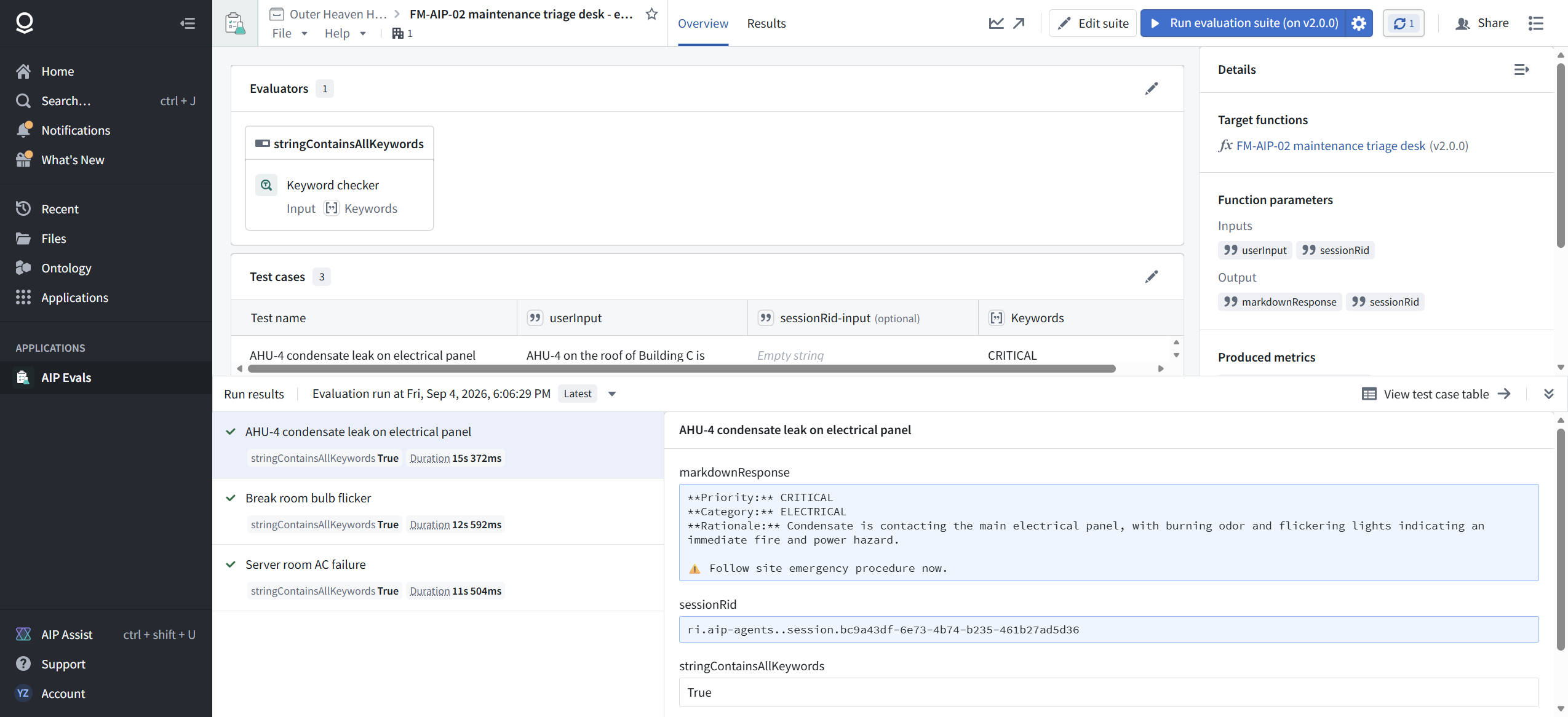
While you compare runs, look at the prose. The AHU-4 rationale said "electrocution hazard" in one run and "power hazard" in another. Priority and category were stable; the wording drifted. Keyword evals absorb that drift. An exact-string eval would have flagged a regression that was not one. Pick evaluators that match the kind of change you actually care about.
[ FIELD REPAIRS ]
FR-1: The save/run race. Symptoms: a case fails right after you fixed it, and the failure detail shows the agent behaving the way your fix expected. Cause: the run executed the suite definition from before your save. The "Saving…" toast does not block the run button. Fix: after editing a suite, wait for the save to complete, then run. If a failure surprises you, check the run's timestamp against your last edit before you touch the agent. Evidence: 18, 19, 20, 21.
FR-2: No cost telemetry from chatbot functions. Not a bug we could fix, a gap you should plan around: compute seconds, input tokens, and output tokens are all No value for chatbot-function targets on this enrollment, on every case of every run. The underlying Logic function meters tokens (FM-AIP-01), but the wrapper does not surface them. If you need per-run cost, meter it at the Logic layer or through the run history dataset, not the results table.
FR-3 (tooling note): the suite editor's Save button enables a beat after the last field change lands. Automating this flow, a click fired the instant after typing finds a disabled button. Humans will not notice; scripts will.
[ FAQ ]
What exactly does a run execute?
The published function version of the chatbot, once per test case, each in a fresh session. The run button labels the version. The failing-case detail shows the sessionRid it created; every case gets a new one per run.
How long does a run take?
In this build, 11 to 15 seconds per case was typical, with one outlier at 31. A three-case suite ran in under a minute of wall clock. Budget by case count, and expect variance.
Keyword checker or LLM-as-a-judge?
Keywords when specific tokens must appear or must not appear: severity labels, category names, disclaimer text. LLM-as-a-judge when correctness is semantic: did the answer address the question, is the rationale sound. Note the deprecation line: Rubric Grader and Contains Key Details are gone for new suites. LLM-as-a-judge is the intended replacement.
Can evals test multi-turn conversations?
The suite has an optional sessionRid input per case, which exists to thread cases into a session. We did not exercise it; our cases are single-turn. That is a seam worth probing before you design a conversational test set.
Does a failing eval mean the agent regressed?
Not necessarily. Our only planned red was the test's fault, not the agent's. Read the response text in the failure detail before you change anything.
Where does run history live long term?
In the Results tab, and optionally in a run history dataset you create from the suite's Overview page. We left it unconfigured. For anything resembling a release gate, configure it, because the dataset is what makes trends and downstream automation possible.
[ NOT TESTED ]
- LLM-as-a-judge and ROUGE Score evaluators
- Multi-turn cases via the sessionRid input
- The run history dataset (Create dataset is one click; we did not click it)
- "Analyze in AI FDE", the AIP-powered failure analysis banner
- Scheduled or CI-triggered runs; every run here was manual
- Behavior of deprecated evaluators in legacy suites
[ NET POSITION ]
Publishing the agent made it callable. Evals make it accountable. The suite we built is small, three cases and one evaluator, and it already caught a real mismatch in under a minute of compute. The failure modes worth remembering are not the agent's: stale suites grade stale definitions, red can mean the test is wrong, and the one thing you cannot see from here is what a run costs. Wire the run history dataset before this becomes a release gate, keep keywords for the floor and judges for the ceiling, and never run on a save you have not watched land.
This closes the AIP track: Logic (FM-AIP-01), agent (FM-AIP-02), and now the regression net (FM-AIP-03). Next up in the manual: the Foundations track, then Ontology, where the work order stops being a string and starts being a thing your whole operation can act on.