Your First Foundry Pipeline, Verified End to End
We built a real Foundry pipeline with one AIP prompt, deployed it, and verified the output row by row against source: 66 of 120 synthetic work orders, zero mismatches. The useful parts are the three field repairs: your Pipeline Builder output label is not the dataset's registered name, fresh datasets are invisible to Quicksearch for a while, and the dataset preview grid is canvas-rendered, so the honest way to check rows is to capture the preview API response and diff that. Nobody's docs tell you the last one.
- A Foundry enrollment where you can create resources in a project
- Pipeline Builder available in your workspace app list
- AIP enabled on the enrollment (check for the AIP logo in the top bar)
Field notes from the Avinyr lab. Everything below ran on a live Foundry enrollment on 2026-08-29. Screenshots are ours. The data is synthetic, generated by a script we keep in the repo, and labeled as such. No client data, no fabricated results.
[ READ THIS FIRST: WHAT THIS MODULE IS ]
This is the foundation module of the pipelines track. The build itself is deliberately simple: one filter, one computed column. What it installs is the working order you will use on every pipeline after this one: prompt, audit, deploy, verify.
AIP got our prompt right this time, and we say so in the write-up. The audit habit looks overwrought attached to a task this easy. That is the point. You install it here, where a miss costs nothing, so it is muscle memory in FM-PB-02, where we run adversarial prompts and AIP does produce a bad chain. If you want the payoff module, skip ahead. If you want the habit, start here.
[ WHAT YOU WILL HAVE AT THE END ]
One deployed batch pipeline. It reads a raw work orders dataset (120 rows), keeps only closed work orders, computes a resolution_days column from the date fields, and writes an output dataset with 66 rows and 12 columns. You will have prompted AIP once, audited what it produced, and verified the built output against the source row by row.
[ STEP 0: THE TEST DATA ]
We generated work_orders_raw.csv with a small script: 120 synthetic maintenance work orders with work_order_id, asset_id, asset_type, site, reported_date, closed_date, priority, status, technician, downtime_hours, parts_cost_usd. 66 rows have status "closed". The generator is in the lab folder so every number in this module can be reproduced.
Why synthetic: module data must be publishable. Generate your own the same way and follow along.
[ STEP 1: CREATE THE PIPELINE ]
- Open Pipeline Builder from the Foundry workspace app list.
- New pipeline. Name: "FM-PB-01 first pipeline with AIP".
- Engine: Batch. We left the default Standard (Spark). A Faster option (DataFusion) was marked New on our enrollment.
- Location: we used the project picker. Note the streaming card was greyed out on this enrollment; batch only.

[ STEP 2: STAGE THE SOURCE ]
- On the empty canvas, add data and upload work_orders_raw.csv as a structured dataset.
- Foundry parsed it and inferred the schema. It auto-typed reported_date and closed_date as date. Check this. If your dates land as strings, the timestamp transform later will not do what you expect.
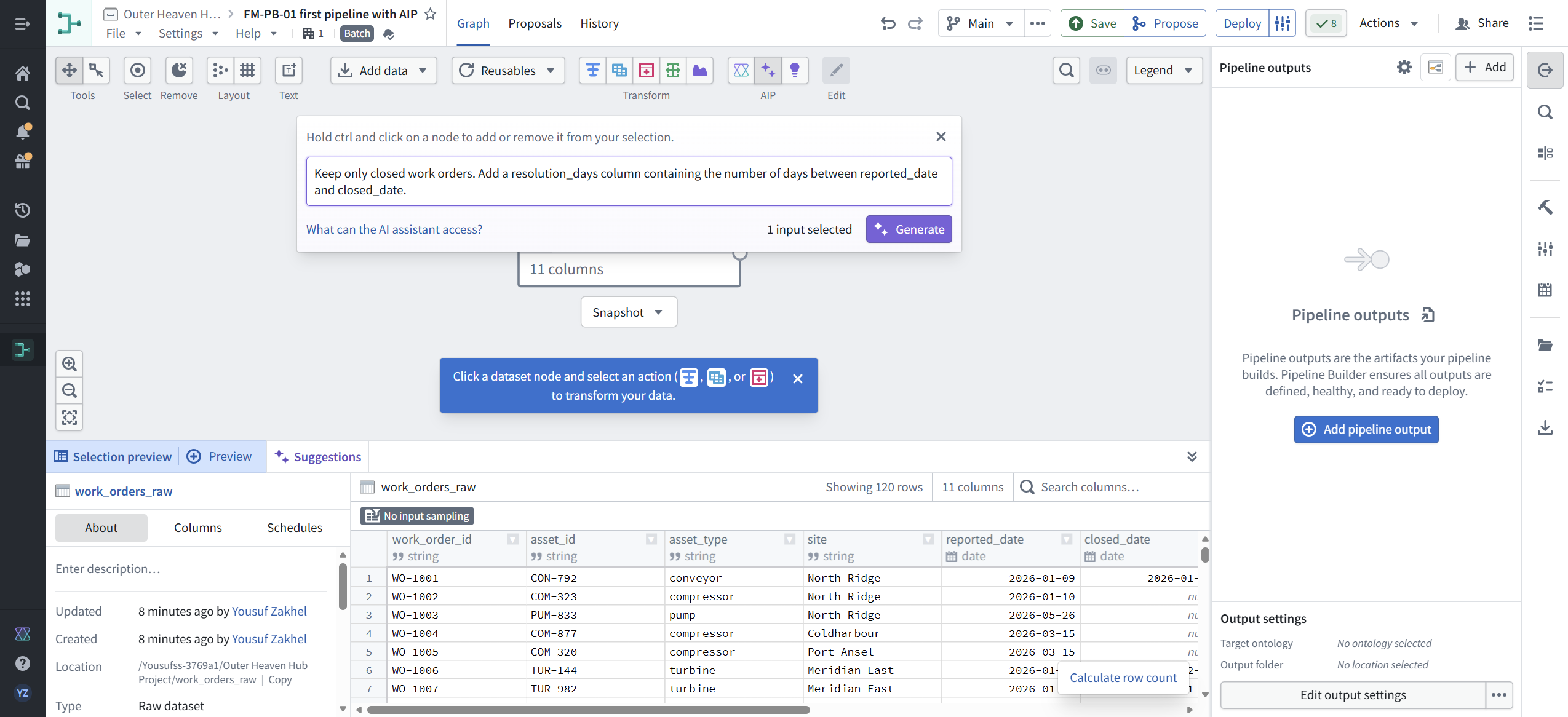
- The dataset node appears on the graph: work_orders_raw, 11 columns.

[ STEP 3: PROMPT AIP ]
Toolbar, AIP group: "Generate pipeline transforms using natural language". Our full prompt:
"Keep only closed work orders. Add a resolution_days column containing the number of days between reported_date and closed_date."
That is the whole prompt. No column type hints, no function names.
[ STEP 4: AUDIT WHAT AIP BUILT ]
AIP proposed a three-board transform chain. We opened every board and checked it before accepting:
- Filter: status is equal to "closed". Correct semantics, correct column, quoted string value.
- Timestamp difference: Start = reported_date, End = closed_date, Unit = Days, output column resolution_days (marked New). Direction matters here. End minus Start gives a positive number when the close date is later. Check this on your own data; a reversed direction passes eyeball review and poisons every downstream metric.
- Projection: all 11 source columns plus resolution_days = 12 columns out.
The preview panel showed 66 rows of 120, all status "closed". That matched the known composition of the synthetic source.
Honest result: AIP produced a correct chain for this prompt. No repair was needed this round. Filter plus date-diff is close to the friendliest prompt you can give it. FM-PB-02 exists because this one went well.

[ STEP 5: ADD THE OUTPUT ]
- Add output, type Dataset. The full type list on this enrollment: Dataset, Object type, Link type, Time series sync, Media set, Geotemporal series sync, Virtual table.
- Map all 12 columns.
- We labeled the output work_orders_closed_enriched in the right panel. Read FR-1 below before you assume that is the dataset's name.

[ STEP 6: DEPLOY ]
- Deploy. Compute profile: Default (Extra small). Errors: 0.
- Build ran and finished: "Last deployment: Succeeded Aug 29, 2026, 7:59 PM". The output node badge flipped to "Deployed and built".

[ STEP 7: VERIFY THE OUTPUT ]
Do not close the tab at green badges. Two tiers of verification, pick per your role.
Operator version (5 minutes, no code):
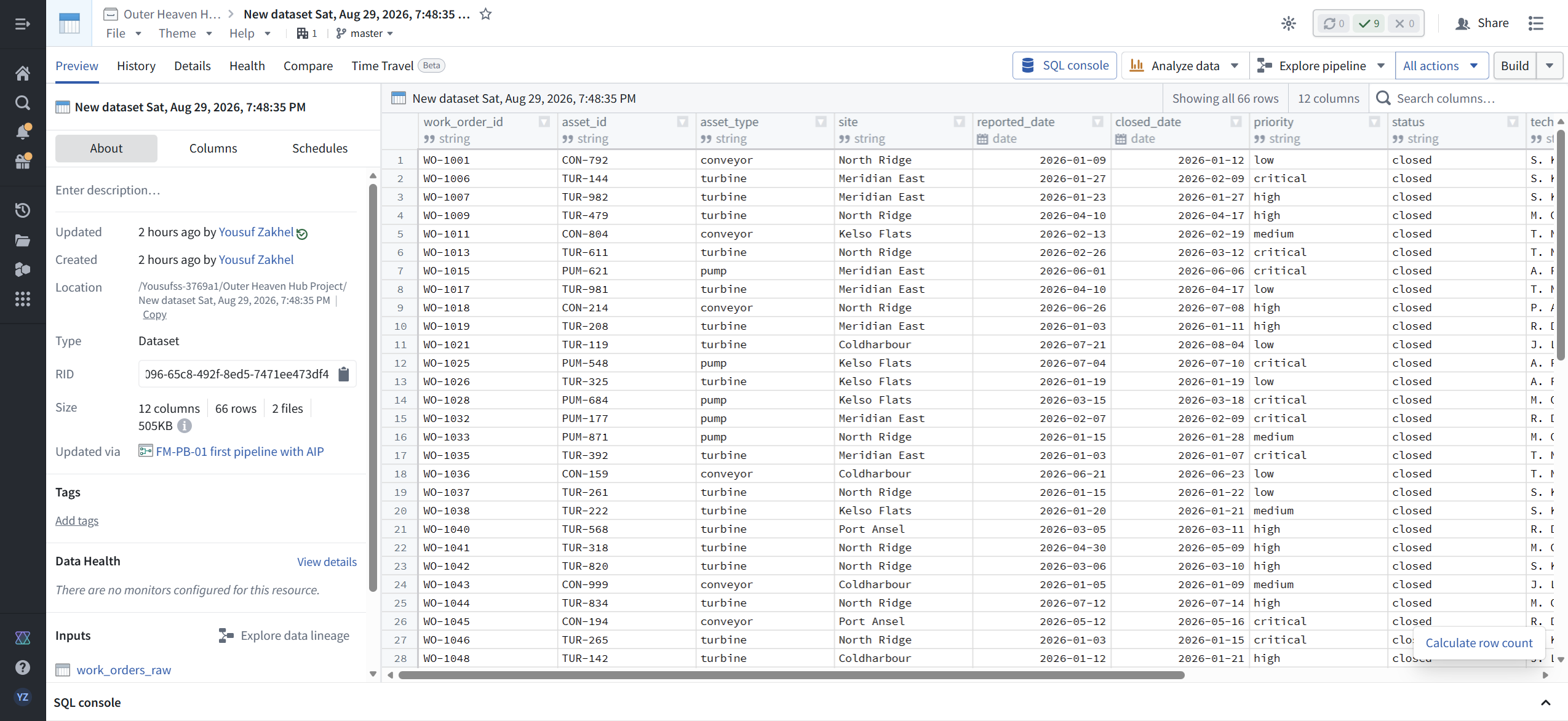
- Open the output dataset page. Confirm the header numbers: 12 columns, 66 rows, branch master. Ours showed "Updated via FM-PB-01 first pipeline with AIP" with work_orders_raw as the lineage input.
- Confirm the row count against expectation. We knew 66 of 120 source rows were closed because we generated the data. On real data, know your expected count before you build, or compute it in the source first.
- Spot-check a row by eye in the preview grid: WO-1001 reported 2026-01-09, closed 2026-01-12, so resolution_days must be 3.
Engineer version (10 minutes, exact):
- The preview grid is canvas-rendered. You cannot select its text, and scripted scroll events do not move it. Eyeball checks do not scale on it.
- Open browser devtools, Network tab, reload the dataset page, and capture the response of /contour/api/dataset-preview/v2/... for your dataset. That is the actual rows as JSON.
- Diff it against source. Our script checks every row: 66/66 work_order_ids match exactly the closed subset of the source, every resolution_days equals closed_date minus reported_date, zero mismatches. Script and captured response are in the lab folder; run python verify_output.py to reproduce.
[ FIELD REPAIRS ]
FR-1. Two names, one dataset: the output label and the registered resource name are different things. What happened: we set the output label to work_orders_closed_enriched in the Pipeline Builder right panel. The panel header changed. The registered dataset kept its auto-generated name, "New dataset Sat, Aug 29, 2026, 7:48:35 PM", on its page title, breadcrumb, About panel, and location path. What to know: this looks like a rename that failed, but it is better understood as two separate objects. The graph node carries a label for readability inside the pipeline. The dataset is a registered Compass resource with its own name, and that name is what search, lineage, permissions, and downstream consumers see. The fix: name the resource where the resource lives. Dataset page, File menu, Rename, type, Enter. Breadcrumb, title, and path all updated (screenshot 41). The pipeline graph node kept showing the old auto-name afterward, which is cosmetic. Lesson: after adding an output, open the dataset page and confirm the registered name and location path. That is the name your consumers will search for.
FR-2. SQL console preview failed on a fresh dataset, cause still open. What happened: SQL console on the dataset page returned "Preview unavailable. An error occurred while loading the preview." It persisted across reload while the main preview grid rendered fine. What we checked: full network capture during console load (no 4xx or 5xx; every request 200), the GraphQL bulk response (valid data, empty scratch worksheet list, no error payloads), and a JS error collector on the page (zero errors, zero unhandled rejections). The failure is not visible in any of those channels from the outside. The fix: none needed for verification; the preview API returned full rows and the dataset itself is healthy. If you hit this, do not assume your data is broken. Check the preview grid and the API before suspecting the build.
FR-3. Fresh datasets are invisible to Quicksearch for a while. What happened: 30 minutes after the build, Quicksearch returned only fuzzy matches to older datasets, nothing for the new one under either its label or its registered name. The fix: navigate by RID (the dataset page URL contains it) or through the pipeline graph's output node. Recheck search later; indexing catches up.
[ PLATFORM NOTES FROM THIS SESSION ]
- "Create project" button on the pipeline form did not respond. The working path is Select location, then "+ Create new project" at the bottom of the picker list.
- Streaming pipeline type was greyed out on this enrollment.
- A What's New modal on canvas entry showed compute profile changes dated Aug 26, 2026. Pipeline Builder is a moving target; we date-stamp every module for this reason. Cloud enrollments expose no build number in the Help menu, so dated in-product announcements are the best freshness signal you get.
- AIP generate panel states: "Prompts are optional when at least one input and one output are selected." Unprompted proposals are a later module.
- The AIP toolbar also has "Explain pipeline transforms in natural language", which reads a chain back to you. Useful second pair of eyes, still not verification.
[ FAQ ]
Did AIP build the whole pipeline correctly on the first prompt?
Yes, for this prompt, and we publish that as a success. Filter plus date-diff is also close to the friendliest task you can give it. FM-PB-02 runs prompts designed to make it slip, and one does. Read this module for the working order, that one for the failure modes.
Is the data real?
It is synthetic, generated by a script in the repo, and labeled synthetic everywhere. 120 rows, 66 closed. Every number in this module can be reproduced from the generator and the verification script.
Why verify against the API instead of the preview grid?
The grid is canvas-rendered, so you cannot copy its text or diff it. The preview endpoint returns the actual rows as JSON. Capturing that response and diffing it against source is the fastest honest check we know. Operators can do the 5-minute version in Step 7 instead.
My output label in Pipeline Builder is not the dataset name. Is something broken?
Probably not. They are two different names for two different objects. See FR-1 for which one matters and where to set it.
How long does this take end to end?
About 40 minutes the first time, including both verification tiers. The build itself is under 15. The rest is the audit and verification, which is the part that generalizes.
[ NET POSITION ]
AIP got you a deployed, verified pipeline from one prompt, but the green badge was never the deliverable. The deliverable is 66 rows that survive a row-by-row diff against source. Prompt, audit, deploy, verify. That order does not change, and in FM-PB-02 you will see why.