Markings and Access Control: When the Ontology Becomes the Access Boundary
We moved governance from theory to a working control on the FM-ON-01 Work Order type: built its first object security policy, a granular rule Asset Type is equal to pump, saved it to the branch past a first-time reindex warning, and proved it in the Test policies simulator before it touched a single user. A custom object with Asset Type pump passes with a green check and every property visible; the same object set to turbine is denied with a red X and every property red. The doctrinal spine is one sentence buried in a dialog callout, quoted verbatim: with an object security policy, users no longer need viewer access on the backing datasource to see object instances, so the ontology becomes the access boundary. We mapped both sides of that boundary, datasource-side requirements versus policy-side requirements, plus the surrounding surfaces: object type roles and permission cards, the backing dataset work_orders_closed_enriched in Compass, and the project Access requirements panel. Five field repairs, including the fifth branch wall of the series (role editing is disabled on a branch while policy creation is allowed) and the markings wall (a project owner finds zero markings to add; marking creation is org-admin territory).
- FM-ON-01. The Work Order object type, its 66 objects, and the branch this module governs all come from there. Do it first.
- FM-ON-02. Roles, submission criteria, and the dry-run-as-verification doctrine that Test policies continues.
Field notes from the Avinyr lab. Everything below was observed live on 2026-09-08 in Ontology Manager and Compass on our cloud enrollment, on the shared lab branch that carries the FM-ON-01 work. The governed object is real: the Work Order type, 66 objects, backed by dataset work_orders_closed_enriched (ri.foundry.main.dataset.4ba2d096-65c8-492f-8ed5-7471ee473df4). Every screenshot is ours.
[ READ THIS FIRST: WHAT THIS MODULE IS ]
This is a governance module, not a click-along tutorial. The question it answers is the one every Foundry deployment eventually has to answer in writing: who sees what, and why. We took the Work Order type from FM-ON-01 and put its first real access control on it: an object security policy with one granular rule, Asset Type is equal to pump. Then we did the part most governance write-ups skip. We proved the policy in the platform's own simulator before it applied to anyone: pump passes, turbine denies, per property, on camera.
The doctrinal spine is one sentence, and it is buried in a dialog callout. When an object type uses an object security policy, users no longer need viewer access on the backing datasource to see object instances. The access boundary moves from the dataset to the ontology. Everything else in this module maps what that move implies: what roles still do, what markings would do if any existed, and where the org-admin territory starts.
[ WHAT YOU WILL HAVE AT THE END ]
One object security policy on the Work Order type, saved to the branch: a granular policy with one rule, Asset Type is equal to pump, listed as Type "Object security policy", Applies to "All properties". One completed proof in the Test policies simulator: a custom object with Asset Type pump passes with a green check and every property visible; the same object set to turbine is denied with a red X and every property red. A walked map of the surrounding access surfaces: the object type's roles and permission cards, the backing dataset's page in Compass, and the project's Access requirements panel. And five field repairs, including the fifth branch wall of the series and the markings wall.
| What you might expect | What Foundry actually does |
|---|---|
| Roles and policies are both ontology config, so both behave the same on a branch | Role editing is disabled on a branch, verbatim: "Editing permissions is disabled on a branch. To update permissions, switch to the main branch." Policy creation is allowed, with a reindex warning on save |
| To see objects, a user needs viewer access on the backing dataset | With an object security policy, verbatim: "users will no longer need viewer access to its backing datasource to see object instances." The ontology becomes the access boundary |
| A security policy applies when you click save | First-time policy configuration triggers a reindex, and policies "will only be active once the reindexing succeeds" |
| You find out a policy is wrong when a user complains | Test policies simulates the policy against any object before it bites. Pump passed green, turbine denied red, per property |
| A project owner can add markings from the project page | The Manage markings panel shows "There are no markings on this project" and a PII search returns "No search results". Markings are org-admin territory |
[ STEP 1: THE SECOND BRANCH WALL ]
Open the Work Order object type in Ontology Manager, Security tab, on the branch. The overview reads Status Experimental, Visibility Normal, Edits Enabled.

The Object type roles section does not open for editing. It shows a wall, verbatim: "Editing permissions is disabled on a branch. To update permissions, switch to the main branch." This is the fifth branch wall of the lab series, after FM-ON-01's merge block, FM-ON-02's Object Explorer main-only reads, FM-ON-03's Resource Imports picker, and FM-WS-01's object set picker. Note exactly what this one blocks: roles. Keep that in your pocket for Step 3, where the same branch lets us create a security policy.

What the wall leaves visible is still worth reading. Roles on this type: Yousuf Zakhel is Ontology Owner. The default role is Ontology Viewer, with the helper, verbatim: "Everyone who can view this ontology will be assigned this role." Ontology owners inherit Ontology Owner on the object type. Roles are the coarse layer: they decide what you can do to the type. Policies, coming in Step 3, decide which objects you can see at all.
[ STEP 2: READ THE PERMISSION CARDS BEFORE YOU TOUCH ANYTHING ]
The Security tab lays out three permission cards, and they are the best short summary of object-type authorization we have found in the product.
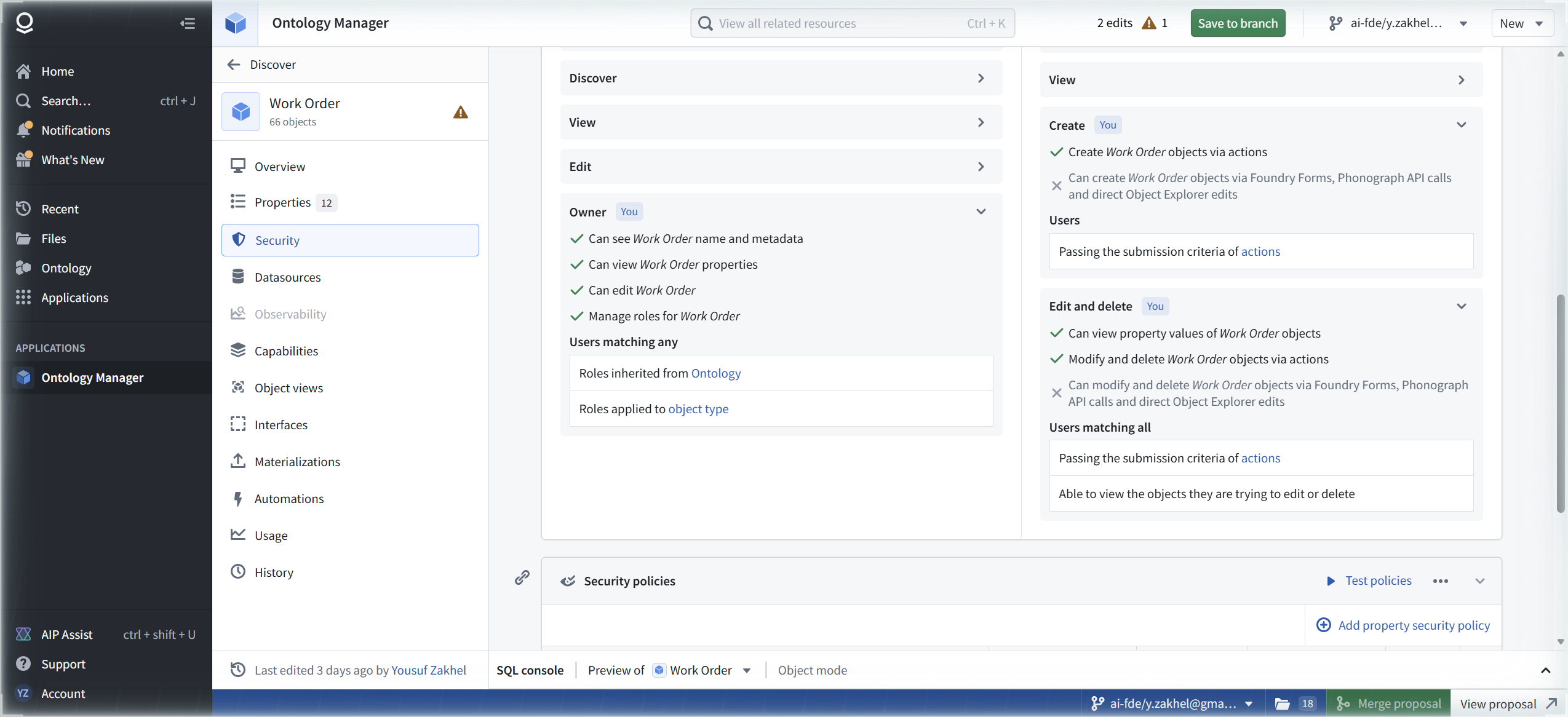
Owner: see name and metadata, view properties, edit, manage roles. Users matching any of: roles inherited from the ontology plus roles applied to the object type.
Create: can create via actions. Cannot create via Foundry Forms, Phonograph API calls, or direct Object Explorer edits. Users, verbatim: "Passing the submission criteria of actions".
Edit and delete: view property values, modify and delete via actions; not via Forms, Phonograph, or direct edits. Users matching all of: passing action submission criteria plus being able to view the objects they are trying to edit or delete.


Two things to internalize. First, every write path except actions is closed by default; the action is the write contract, again, same lesson as FM-ON-02. Second, edit permission presupposes view permission. Which raises the question the rest of the module answers: who can view? Below the cards, the Security policies section answers with an empty state, verbatim: "No security policies configured. Object instances are secured by their datasource." One button: "Create object security policy". That sentence is the default doctrine: without a policy, dataset permissions rule. We clicked the button.
[ STEP 3: THE SENTENCE THAT MOVES THE BOUNDARY ]
The Configure policy dialog opens with a callout that deserves to be quoted in full, verbatim:
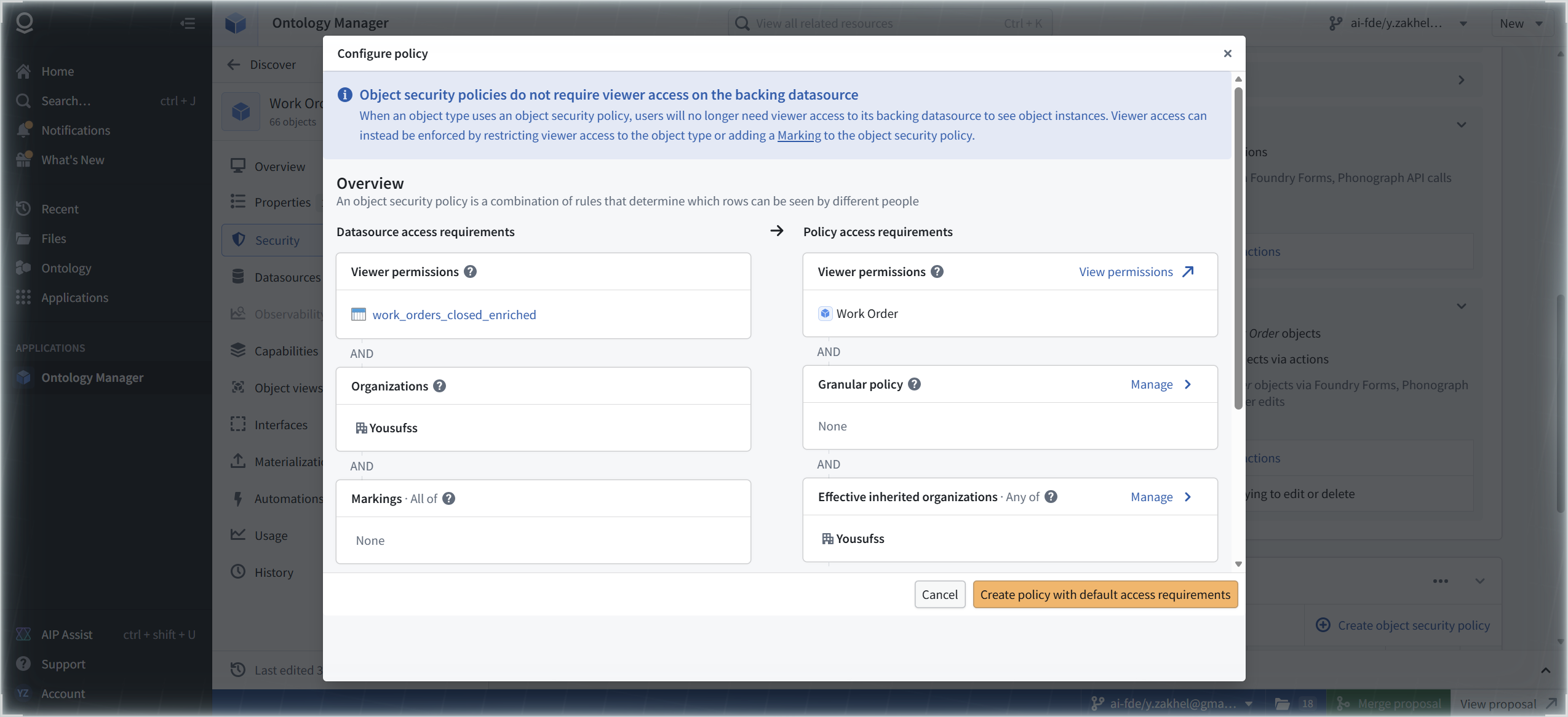
"Object security policies do not require viewer access on the backing datasource. When an object type uses an object security policy, users will no longer need viewer access to its backing datasource to see object instances. Viewer access can instead be enforced by restricting viewer access to the object type or adding a Marking to the object security policy."
Read it twice. This is the inversion that turns the ontology into the security layer. Up to now, dataset permissions decided object visibility. From the moment this policy activates, the object type decides. The dataset's viewer list stops being the gate and becomes a back door you still have to govern. We call this the single most important sentence in Foundry governance, and it lives in a dialog callout.
The same dialog draws the access requirements model, two sides of one AND gate. Datasource side: viewer permissions on work_orders_closed_enriched, AND organization membership, AND markings: all of (none configured). Policy side: viewer permissions on the Work Order object type, AND the granular policy we are about to write, AND effective inherited organizations: any of ours. Once the policy exists, the left column stops ruling object visibility and the right column takes over.
[ STEP 4: BUILD THE GRANULAR RULE ]
The granular policy builder starts empty: "Match [All] of these rules", with one affordance, "+ Add a condition or a logical operator".

Add a condition and the builder offers two condition types: "Current user", conditions on user attributes, and "Property", the form we want: a property value must be something. Comparators: "Is equal to" and "Is included in".
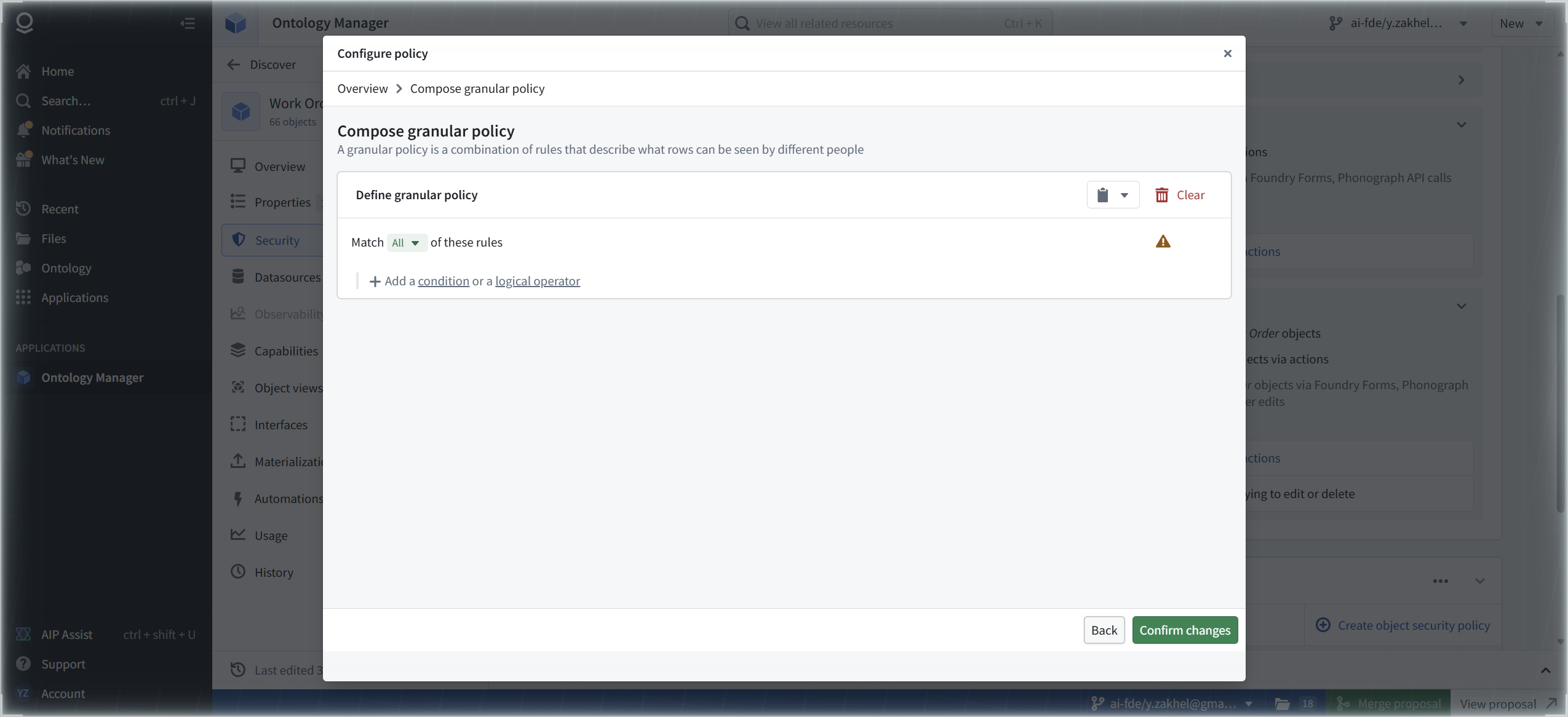

We built one rule against real data: Asset Type is equal to pump. The value is not arbitrary; pump is one of the four real asset types in the FM-PB-01 data (compressor, conveyor, pump, turbine). The overview then reads: granular policy, 1 rule.


One rule is enough for the doctrine. The policy says: of the 66 work orders, you see the pumps. Everything else does not exist for you. Current user conditions, the logical operators, and Is included in are all real and all untested here; see NOT TESTED.
[ STEP 5: SAVE, PAST THE REINDEX WARNING ]
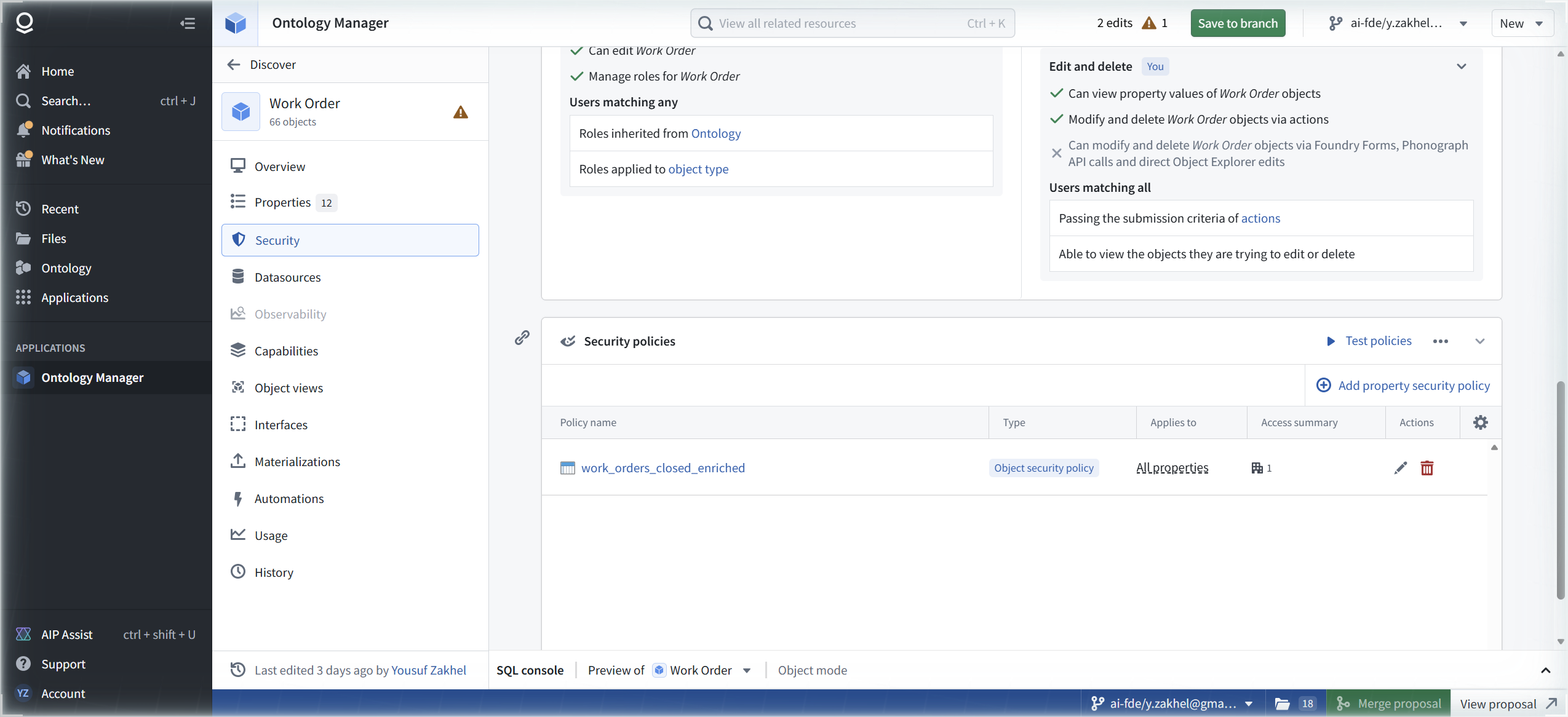
Create. The policy lands in the list under its backing dataset's name, work_orders_closed_enriched, Type "Object security policy", Applies to "All properties". The top bar now reads "2 edits" with a "Save to branch" button.
Review changes before saving, always. The dialog's tabs: All changes 2 / Warnings 1 / Errors / Migrations / Conflicts / Indexing on branch. Our change: "Created security policy". The warning, verbatim: "Configuring security policies for the first time to this object type will trigger a reindex, and security policies will only be active once the reindexing succeeds."
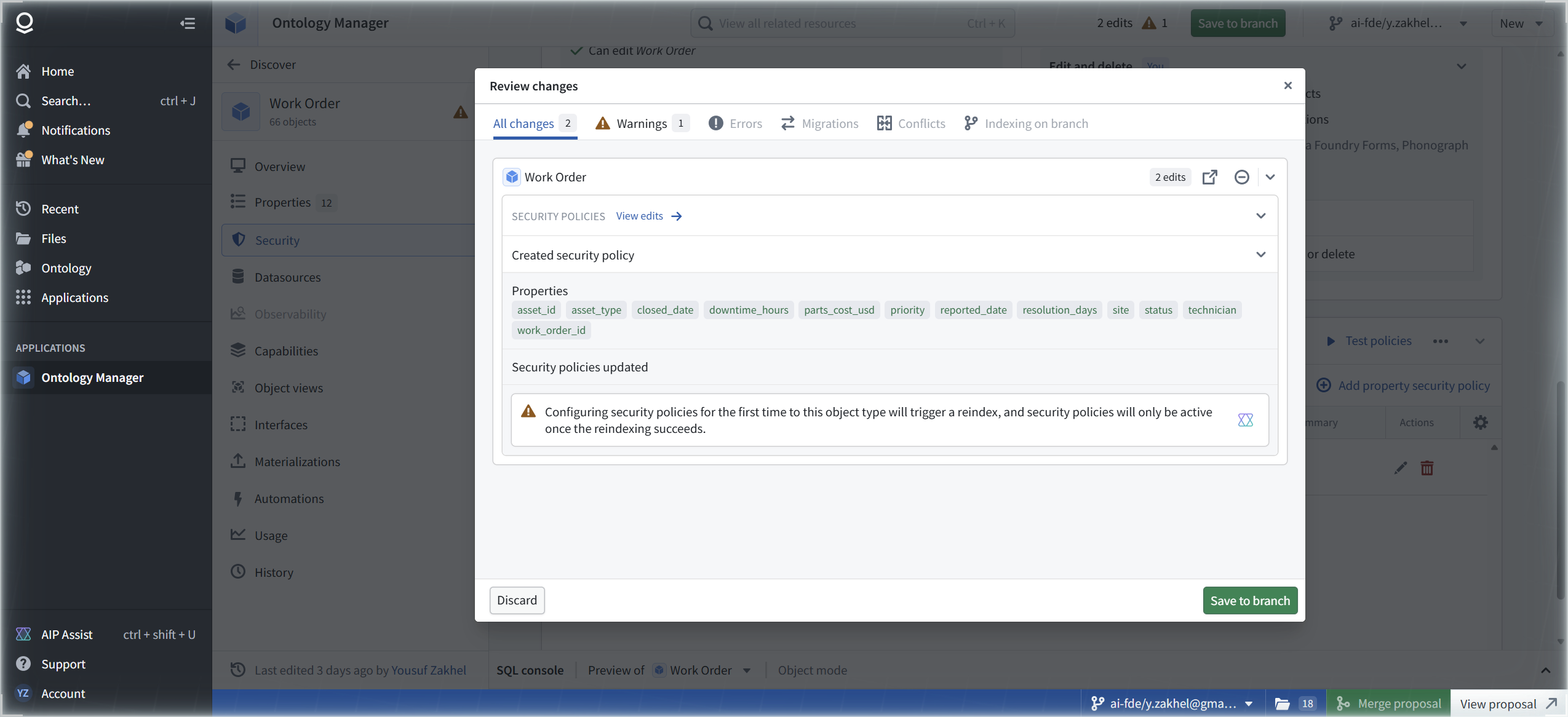
That warning is the honest fine print on Step 3's inversion: the boundary moves when the index moves, not when you click save. Save to branch. Toast: "Reloading latest Ontology..." The top bar clears; the bottom proposal bar shows 18 changes with Merge proposal and View proposal. Saved.
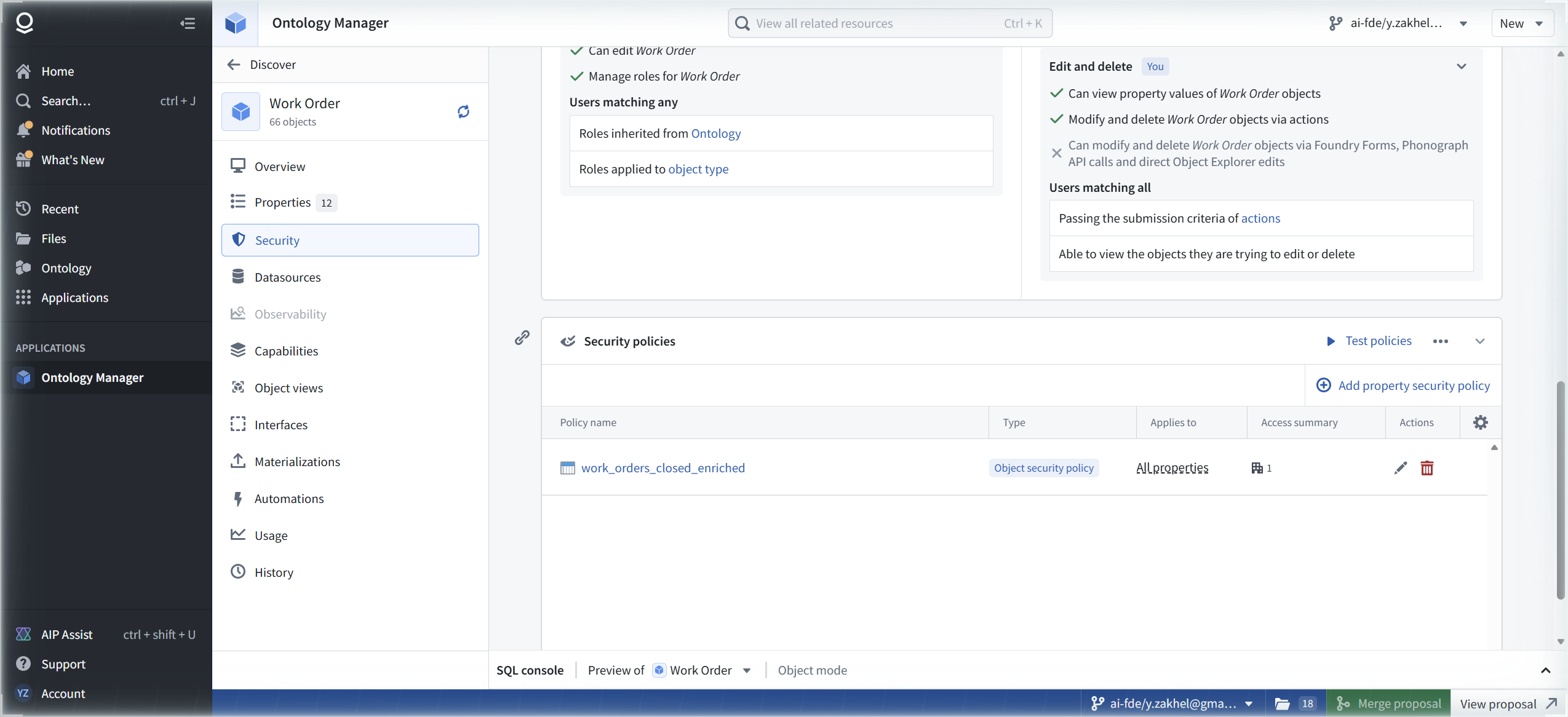
And here is the finding that reframes the branch walls. Roles: blocked on a branch (Step 1). Policies: allowed on a branch, with a reindex consequence. The branch boundary is not drawn between safe and unsafe operations. It is drawn between roles and policies. Plan governance work accordingly: policy design can happen on a branch; role changes cannot.
[ STEP 6: TEST POLICIES, PROOF BEFORE IT BITES ]
This is the section the module exists for. Next to the policy list sits a button most governance guides never mention: "Test policies".
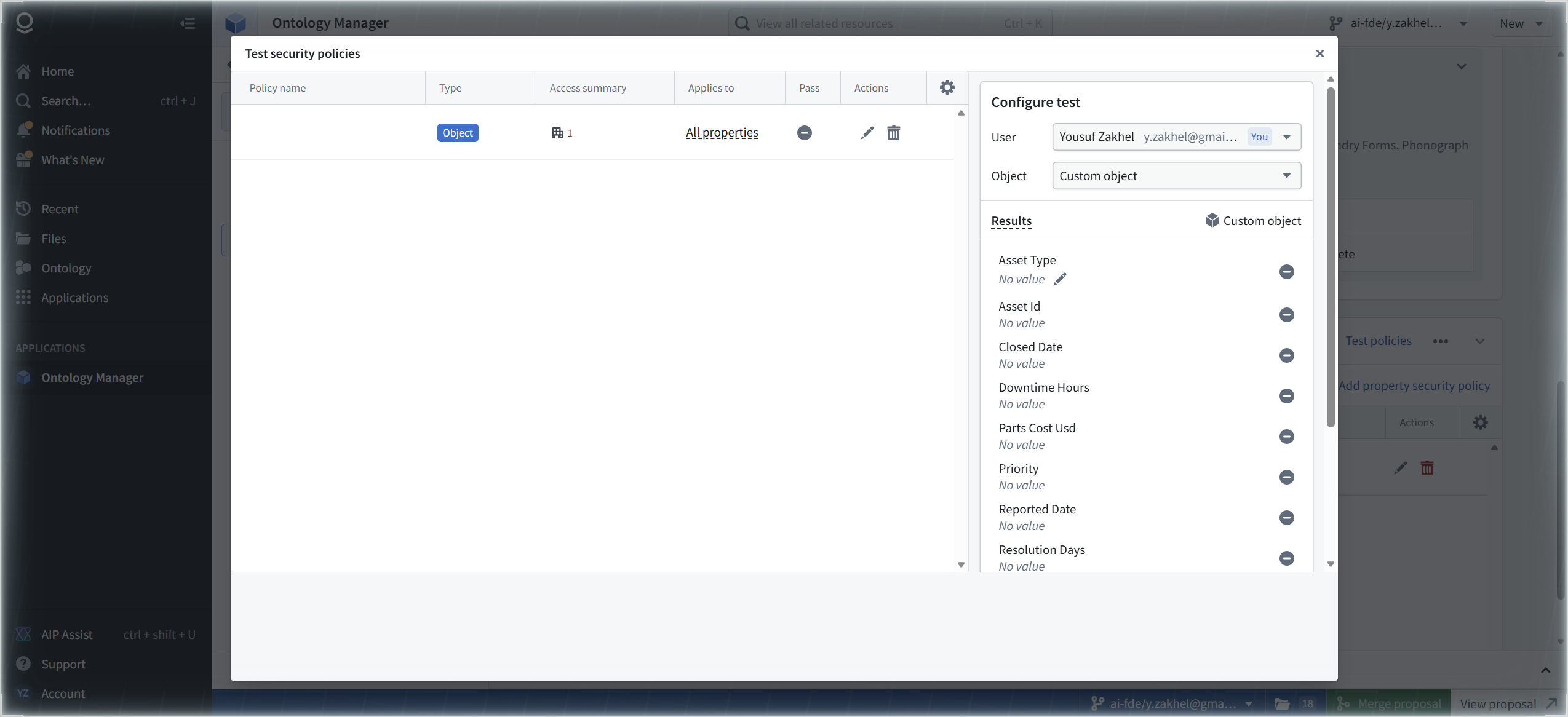
The dialog, "Test security policies", splits in two. Left: a table of the policies on the type, columns Policy name / Type / Access summary / Applies to / Pass / Actions. Right: a "Configure test" panel with a User dropdown (ours shows Yousuf Zakhel, marked "You") and an Object dropdown set to "Custom object". Below, a Results panel lists every property of the object with "No value" and an Edit value pencil per row.
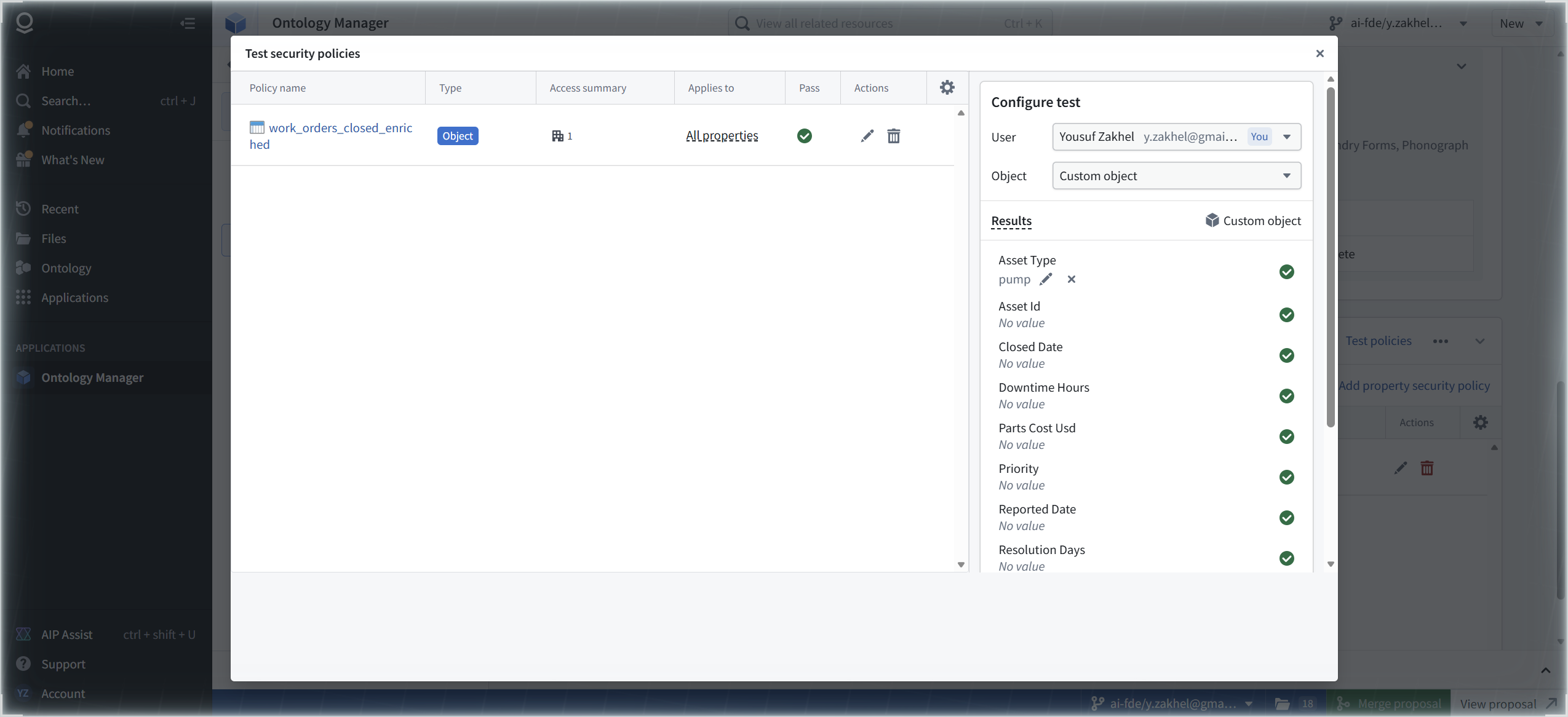
Set Asset Type to pump on the custom object. The Pass column flips to a green check. Every property row gets a green circle: visible.
Now set Asset Type to turbine. The Pass column flips to a red X. Every property row shows a red deny icon.

That is the whole doctrine in two clicks. The granular rule is enforced exactly as written, and you watched it happen without a single real user's access changing. Test policies is the audit tool: you can prove a policy before anyone gets hurt by it. FM-ON-02's dry run proved the action before writeback; this simulator proves the boundary before enforcement. Same doctrine, governance edition.
One cosmetic trap, reported because it will confuse you mid-test: the Results row keeps displaying "No value" next to a committed override. Reopening Edit value shows the real value. The test engine has the value; the row display does not. Cosmetic, but a display that misleads during a security test is a trust problem. Trust the Pass column and the property icons, not the row text.
[ STEP 7: THE DATASOURCE SIDE OF THE LINE ]
To see what the policy replaces, we went to look at the datasource itself. First, a field note we keep relearning: we guessed the route /workspace/files and got the enrollment's 404, "Page not found". The working route is /workspace/compass, which redirects to /workspace/compass/home. Do not guess Foundry routes; FM-ST-03 mapped the real ones.
Compass search for work_orders_closed_enriched lands on the dataset page. The About panel: created Aug 29 2026 7:59 PM and updated Aug 29 2026 8:00 PM by Yousuf Zakhel, Type Dataset, 12 columns, 66 rows, 2 files, located in the Outer Heaven Hub Project, updated via the FM-PB-01 first pipeline with AIP.

Details > About fills in the provenance: Columns 12, Row count 66, Files Total 2, Size Total 505KB (Dataset 5.9KB), Job type Transforms, Inputs work_orders_raw, Outputs assets. Top right of the panel sits an "Explore lineage" link. That link is the door to FM-GV-02, where lineage becomes the audit weapon. Noted, not opened.

Hold the picture: this dataset has its own permissions, its own project, its own markings slot. Until this session, those decided who could see the 66 work orders. With the policy saved, the ontology takes over object visibility, and this panel becomes the back door you still have to govern, not the front one.
[ STEP 8: PROJECT ACCESS AND THE MARKINGS WALL ]
The project page in Compass, Outer Heaven Hub Project, describes itself, verbatim: "Central Intelligence Hub for Operatives, Missions, Equipment, and Intel Analysis." Folders 01_Raw_Data through 07_Code_Repositories, the assets, the FM-* artifacts. The left menu includes Project usage and Access graph; the right rail carries tabs Overview / Access / Activity / Resource queues / Branch protection.

Access > Requirements states the gate in one sentence, verbatim: "Users must meet all of the following requirements to access this project". Three blocks joined by AND: Roles (Default role: Viewer; your additional roles: Owner; a Manage link), Organizations - Any of (our org; a Manage link), Markings (None; an Add link). Below them: "No constraints set - Optional" with a plus. Same shape as the ontology's model from Step 3: roles, organizations, markings, ANDed.

We clicked Add on Markings. The "Manage markings" panel opens with a "Search for markings..." box and the sentence, verbatim: "There are no markings on this project". Searching "PII" returns, verbatim: "No search results". The Save button sits disabled; Cancel is the only live control.
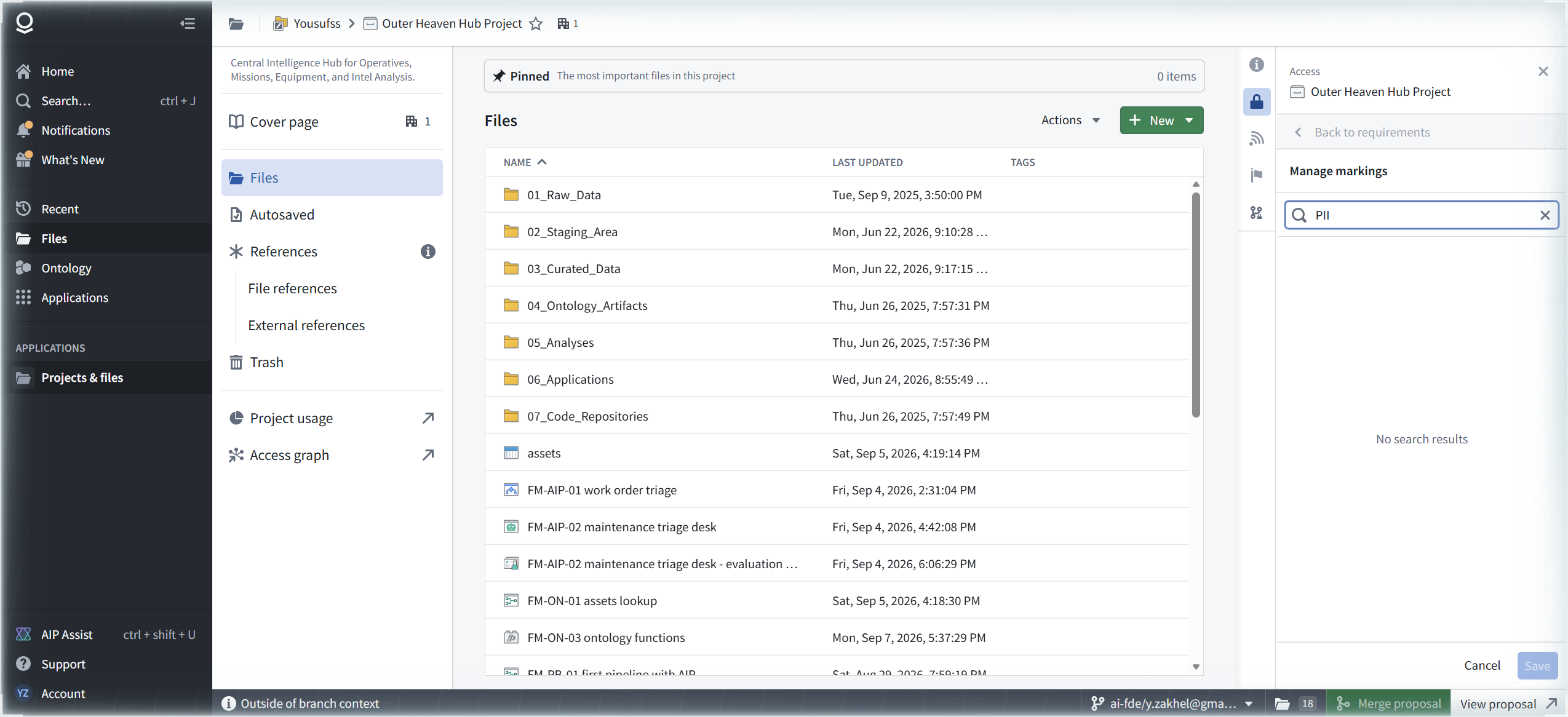
That is the markings wall, and it is organizational, not technical. On this enrollment there are no markings to add, because marking creation is an organization-admin operation. It is not something a project owner can do from Compass, no matter how many access panels they own. If your governance plan involves markings, that conversation happens in Control Panel with an org admin before it happens in any project. One navigation footnote, verbatim, for the tooltip that appears if you try to leave the panel with a pending search: "Save or cancel to navigate back".
The last tab on Access is "Check access": a dropdown, "Select a user or group...", with the helper, verbatim: "Select a user or group to check if they meet access requirements for this project." The project-level sibling of Test policies: same doctrine, prove the gate before it bites, one layer up.

[ FIELD REPAIRS ]
FR-1: the branch boundary is drawn between roles and policies, not between safe and unsafe. Symptoms: on a branch, the Object type roles section shows a wall, verbatim "Editing permissions is disabled on a branch. To update permissions, switch to the main branch.", while Create object security policy works and saves to the same branch. Cause: by design; role editing is main-only, policy authoring is branch-capable. Fix: plan governance work in two lanes. Design and test policies on your working branch; schedule role changes for main. Evidence: 02-object-type-roles-branch-disabled.png, 11-policy-created-2-edits-save-to-branch.png, 13-review-changes-reindex-warning.png.
FR-2: an object security policy inverts datasource access. Symptoms: the empty state "Object instances are secured by their datasource" gives way to a dialog callout stating, verbatim, that with a policy "users will no longer need viewer access to its backing datasource to see object instances." Cause: by design, and it is the point of the feature. Fix: none; govern accordingly. Once a policy exists, the ontology is the access boundary: enforce viewer access on the object type, or add a marking to the policy. And remember the reindex fine print: the boundary moves when the reindex succeeds, not when you click save. Evidence: 03-edit-delete-permissions-no-security-policies.png, 05-configure-policy-dialog-access-requirements.png, 13-review-changes-reindex-warning.png.
FR-3: Test policies is the audit tool. Symptoms: a new policy is unproven; you cannot tell who it will bite until it bites. Cause: not a defect; the proof instrument exists and is one click away, it just hides in plain sight. Fix: Test policies > Custom object > set the properties your rule reads > watch the Pass column and the per-property icons. Our rule: pump passes green, turbine denies red. Prove every policy this way before merge. Evidence: 15-test-security-policies-dialog.png, 16-test-pump-passes-green.png, 17-test-denied-red.png.
FR-4: markings are org-admin territory. Symptoms: project Access > Markings > Add opens a Manage markings panel showing "There are no markings on this project"; searching "PII" returns "No search results"; Save is disabled and Cancel is the only live control. Cause: no markings exist on the enrollment, and creating them is an organization-admin operation, not a project-owner one. Fix: if the plan needs markings, start in Control Panel with an org admin. Compass is where markings get applied, not born. Evidence: 21-project-access-requirements-panel.png, 22-manage-markings-no-results.png.
FR-5: the Test policies Results panel displays "No value" for committed overrides. Symptoms: after setting Asset Type on the custom object, the row still reads "No value". Cause: cosmetic; reopening Edit value shows the committed override, and the Pass column and property icons respond to the real value. Fix: trust the verdicts, not the row text; reopen Edit value when in doubt. Evidence: 15-test-security-policies-dialog.png, 16-test-pump-passes-green.png, 17-test-denied-red.png.
[ FAQ ]
Did the policy actually change anyone's access yet?
Yes, on the branch, and FM-GV-02 measured it the same day. With the policy saved, the Work Order header dropped from 66 objects to 13, and ontology SQL against the type returned exactly one group: 11 objects, all pump, matching the FM-PB-01 ground truth CSV. The simulator result from Step 6 was not hypothetical; the live object layer agrees with it. One caveat, stated honestly: the header count (13) and the query count (11) had not converged at capture time, consistent with the reindex warning above. Trust the query during the reindex window. Enforcement on main is still a merge away, same as everything else on this branch since FM-ON-01.
Does the policy delete or hide the dataset?
Neither. The dataset's own permissions still govern who can open it in Compass. The policy governs object visibility through the ontology: with the policy active, a user can see pump work orders as objects without viewer access on work_orders_closed_enriched, and cannot see turbine work orders at all. Two gates, two doors. Step 7's panel is the gate the policy replaces for object visibility, not a gate it removes.
Why a property rule and not something about the user?
Because property rules are the simplest honest demonstration, and pump versus turbine is real data from FM-PB-01. The builder's other condition type, Current user, is the one most production policies will lean on: rule on a user attribute, not a property value. Untested here, on the list.
Can I test as a different user?
The Configure test panel has a User dropdown; on this enrollment the only entry is Yousuf Zakhel, marked "You". Single-user enrollment reality: we could vary the object, not the user. The mechanics are identical; the coverage is not.
Where do markings come from, then?
Not from Compass. The project owner sees an empty list and a disabled Save. Markings are created at the organization level, by org admins, in Control Panel. Until that happens, the Markings line in every access requirements panel reads None, and the markings chapter of your governance plan is blocked on an org-admin conversation, not on anything you can click.
[ NOT TESTED ]
- Current user conditions (user attribute rules), the other half of the condition picker
- The "Is included in" comparator and the logical operators under "+ Add a condition or a logical operator" (our policy is one rule, Match All)
- Adding a marking to an object security policy (blocked on FR-4: no markings exist on this enrollment)
- Multiple policies on one type, and how their Pass verdicts combine in Test policies
- Check access against a second user or a group (single-user enrollment)
- Constraints, the optional plus under the requirements blocks
- The Access graph and Project usage left-menu items, and the Branch protection tab
- What the first-time reindex looks like after merge, and how long "only active once the reindexing succeeds" takes in practice
- Explore lineage (deliberately deferred; it is the FM-GV-02 entry point)
[ NET POSITION ]
The Work Order type now has a governed access boundary, proven before it bites. One object security policy, one granular rule, Asset Type is equal to pump, saved to the branch past the reindex warning, and verified in Test policies in both directions: pump passes with every property green, turbine denies with every property red. The doctrine sentence is on the record verbatim: with an object security policy, users no longer need viewer access on the backing datasource, so the ontology becomes the access boundary and governance work moves with it. The walls are mapped too: roles are main-only on a branch while policies are branch-capable, and markings are org-admin territory that no project owner can reach from Compass. Next in the track: FM-GV-02 picks up the "Explore lineage" link from Step 7 and turns lineage into the audit weapon.